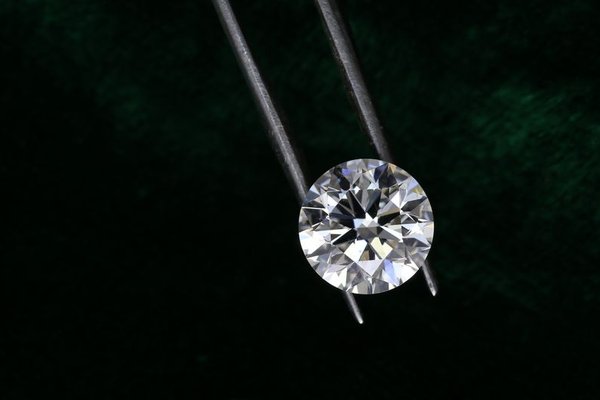
Carat is one of the first numbers shoppers notice when comparing engagement-ring diamonds, but it is not a direct measurement of how large a stone will look. Diamond carat weight measures mass: one metric carat equals 200 milligrams. Visible size depends on the stone’s face-up dimensions, shape, proportions, and even the width of the wearer’s finger. That is why two diamonds with the same carat weight can create different impressions once they are set in rings.
Carat Weight and Visible Size Are Not the Same Thing
The simplest way to understand carat vs size is to think of weight and footprint separately. Carat tells you how much diamond material is present. The footprint is the area you see when looking down at the stone. A diamond can carry extra weight in its depth, girdle, or lower portion, where that weight contributes little to its face-up spread.
This matters because diamond prices often rise around popular milestone weights such as 1.00, 1.50, and 2.00 carats. A stone that reaches a round-number weight is not automatically more impressive on the finger than a slightly lighter diamond with efficient proportions. Comparing measurements alongside carat weight can therefore reveal better value.
How Diamond Dimensions Tell You More
Diamond dimensions are expressed in millimetres. For a round brilliant, measurements include minimum diameter, maximum diameter, and depth. Fancy shapes such as oval, pear, emerald, radiant, or marquise cuts are commonly described by length, width, and depth. These figures help you estimate how much surface area the diamond presents from above.
When comparing two stones of the same shape and similar quality, look at their face-up measurements rather than assuming the heavier diamond must be larger. A 0.98-carat round, for example, may look virtually the same size as a 1.00-carat round if their diameters are close. That small difference in weight can matter more to the price than to the eye.
For more on proportions and light performance, see our diamond cut guide. Chasing maximum spread at the expense of sensible proportions can reduce brilliance.
Why Shape Changes the Diamond Size on Finger
Shape strongly influences perceived size. Elongated outlines such as oval, pear, marquise, and some emerald or radiant cuts can cover more length across the finger than a round diamond of similar weight. That does not mean every elongated stone will look larger, because its specific length-to-width ratio and depth still matter, but shape can change the visual impression considerably.
A round brilliant distributes its weight in a compact, symmetrical outline. An oval of comparable carat weight may appear longer and create a larger-looking silhouette. A marquise often produces even more length, while a square cushion may carry more weight in depth and appear smaller than expected for its carat figure.
Our engagement ring diamond shapes guide can help you compare outline, proportions, and setting style without treating carat weight as the only size indicator.
Finger Size and Setting Change the Visual Scale
The same diamond can look different on two hands. A stone occupies a greater proportion of a narrow finger than it does on a wider finger, so diamond size on finger is partly about scale. This is one reason online photographs can be misleading when they do not identify ring size.
Settings also influence perceived coverage. A slim band can make the centre stone appear more prominent, while a wide band can make it look relatively smaller. Halo settings add a border of smaller diamonds around the centre, increasing the overall visual footprint. Bezel settings can create a clean outline around the stone, although the effect depends on the metal thickness and design.
A Practical Way to Compare Stones Before Buying
Suppose you are choosing between two round diamonds: one weighs just under one carat and the other reaches the full 1.00-carat milestone. Instead of deciding by weight alone, compare their listed diameters, cut quality, and price. If their face-up measurements are nearly identical, the lighter stone may deliver essentially the same visible size while leaving more of your budget for cut, colour, clarity, or the setting.
For online shopping, note three figures for every candidate: carat weight, face-up measurements, and total price. Compare them side by side. If possible, view videos under similar lighting and ask for a hand or ring-size reference. This simple process prevents a larger carat number from overshadowing what you will actually see.
Do Not Chase Spread at the Expense of Cut
A wide-looking diamond is not automatically a well-cut diamond. A stone can be cut too shallow, increasing its diameter but compromising light return. Another may hide weight in excessive depth and look small for its carat weight. The best choice balances attractive spread with proportions that support brightness, fire, and scintillation.
A grading report is useful because it lets you verify carat weight and dimensions rather than relying only on a retailer’s description. For round brilliants, cut grades add another helpful comparison point. For fancy shapes, pay close attention to the measurements, outline, symmetry, and visual performance.
How to Get More Visible Size for Your Budget
Start by shopping slightly below popular milestone weights instead of assuming you need an exact number. A stone just under 1.00 carat can sometimes offer a very similar visual impression, depending on its dimensions. Then compare shapes: an oval or marquise may provide more finger coverage than a round at a similar weight.
Choose the setting intentionally as well. A narrow band, halo, or carefully proportioned bezel can increase visual impact without increasing centre-stone carat weight. See our engagement ring setting guide for more on apparent size and everyday wear.
Frequently Asked Questions
Does a higher carat diamond always look bigger?
No. Higher carat weight generally means more diamond mass, but visible size depends on shape, face-up dimensions, and proportions. Two diamonds of the same weight can look different from above.
What matters more when judging size: carat or millimetres?
Use both, but millimetre measurements are more useful for judging face-up size. Carat tells you weight, while length and width or diameter show how much space the diamond occupies visually.
Can a 0.90-carat diamond look like a 1.00-carat diamond?
It can, particularly when the stones have similar face-up measurements. The difference may be difficult to notice once set, so comparing dimensions is more useful than focusing only on the milestone number.
Which diamond shapes tend to look largest for their carat weight?
Elongated shapes such as oval, marquise, and pear often create strong finger coverage because they extend farther along the finger. Individual proportions still matter, so compare actual measurements rather than shape names alone.
Choosing Size with More Confidence
A useful diamond carat size guide should lead you beyond the number on the grading report. Carat weight tells you how much the diamond weighs; dimensions, shape, proportions, setting, and finger size tell you how large it is likely to look. Comparing those factors together makes it easier to find a stone with the visual presence you want without paying purely for a round-number weight. The best value is the diamond whose beauty, spread, and overall quality work together on the hand.